<?xml version="1.0" encoding="utf-8"?><feed xmlns="http://www.w3.org/2005/Atom" ><generator uri="https://jekyllrb.com/" version="3.9.4">Jekyll</generator><link href="https://heykarimoff.github.io/feed.xml" rel="self" type="application/atom+xml" /><link href="https://heykarimoff.github.io/" rel="alternate" type="text/html" /><updated>2024-02-12T22:49:18+11:00</updated><id>https://heykarimoff.github.io/feed.xml</id><title type="html">MK’s Journal</title><subtitle>Write an awesome description for your new site here. You can edit this line in _config.yml. It will appear in your document head meta (for Google search results) and in your feed.xml site description.</subtitle><author><name>Mukhammad Karimov</name><email>hey@karimoff.me</email></author><entry><title type="html">Welcome to Jekyll!</title><link href="https://heykarimoff.github.io/personal/welcome-to-jekyll/" rel="alternate" type="text/html" title="Welcome to Jekyll!" /><published>2024-02-10T15:10:11+11:00</published><updated>2024-02-10T15:10:11+11:00</updated><id>https://heykarimoff.github.io/personal/welcome-to-jekyll</id><content type="html" xml:base="https://heykarimoff.github.io/personal/welcome-to-jekyll/"><![CDATA[<p>You’ll find this post in your <code class="language-plaintext highlighter-rouge">_posts</code> directory. Go ahead and edit it and re-build the site to see your changes. You can rebuild the site in many different ways, but the most common way is to run <code class="language-plaintext highlighter-rouge">jekyll serve</code>, which launches a web server and auto-regenerates your site when a file is updated.</p>

<p>Jekyll requires blog post files to be named according to the following format:</p>

<p><code class="language-plaintext highlighter-rouge">YEAR-MONTH-DAY-title.MARKUP</code></p>

<p>Where <code class="language-plaintext highlighter-rouge">YEAR</code> is a four-digit number, <code class="language-plaintext highlighter-rouge">MONTH</code> and <code class="language-plaintext highlighter-rouge">DAY</code> are both two-digit numbers, and <code class="language-plaintext highlighter-rouge">MARKUP</code> is the file extension representing the format used in the file. After that, include the necessary front matter. Take a look at the source for this post to get an idea about how it works.</p>

<p>Jekyll also offers powerful support for code snippets:</p>

<figure class="highlight"><pre><code class="language-ruby" data-lang="ruby"><span class="k">def</span> <span class="nf">print_hi</span><span class="p">(</span><span class="nb">name</span><span class="p">)</span>
  <span class="nb">puts</span> <span class="s2">"Hi, </span><span class="si">#{</span><span class="nb">name</span><span class="si">}</span><span class="s2">"</span>
<span class="k">end</span>
<span class="n">print_hi</span><span class="p">(</span><span class="s1">'Tom'</span><span class="p">)</span>
<span class="c1">#=&gt; prints 'Hi, Tom' to STDOUT.</span></code></pre></figure>

<p>Check out the <a href="https://jekyllrb.com/docs/home">Jekyll docs</a> for more info on how to get the most out of Jekyll. File all bugs/feature requests at <a href="https://github.com/jekyll/jekyll">Jekyll’s GitHub repo</a>. If you have questions, you can ask them on <a href="https://talk.jekyllrb.com/">Jekyll Talk</a>.</p>]]></content><author><name>Mukhammad Karimov</name><email>hey@karimoff.me</email></author><category term="personal" /><category term="jekyll" /><category term="blog" /><category term="website" /><category term="github" /><category term="pages" /><summary type="html"><![CDATA[You’ll find this post in your _posts directory. Go ahead and edit it and re-build the site to see your changes. You can rebuild the site in many different ways, but the most common way is to run jekyll serve, which launches a web server and auto-regenerates your site when a file is updated.]]></summary></entry><entry><title type="html">Squash Migrations in Django</title><link href="https://heykarimoff.github.io/django/squash-migrations-in-django/" rel="alternate" type="text/html" title="Squash Migrations in Django" /><published>2019-11-17T18:20:53+11:00</published><updated>2019-11-17T18:20:53+11:00</updated><id>https://heykarimoff.github.io/django/squash-migrations-in-django</id><content type="html" xml:base="https://heykarimoff.github.io/django/squash-migrations-in-django/"><![CDATA[<h3 id="introduction">Introduction</h3>

<p>If you have been working on Django based web application, you will end up having dozens of migration files.
Though it doesn’t affect the application performance at all, it’ll take time to apply them all if you spinning up with new database.
Sometimes having a single fresh migration file per app is desirable. 
In this article, we will be addressing two known methods to achive that 😎.</p>

<h3 id="method-one">Method One</h3>

<p>Official Django Documentation recommends <a href="https://docs.djangoproject.com/en/2.1/topics/migrations/#migration-squashing">squashing migrations</a>.</p>

<h4 id="steps">Steps</h4>

<ol>
  <li>Squash existing migrations. Run <code class="language-plaintext highlighter-rouge">django-admin squashmigrations</code>.</li>
  <li>Apply new squashed migration file(s). Run <code class="language-plaintext highlighter-rouge">django-admin migrate</code></li>
  <li>Delete old migrations, keep squashed migration(s) only.</li>
</ol>

<p>Squashed migrations are special because they:</p>
<ul>
  <li>have word <code class="language-plaintext highlighter-rouge">squashed</code> in the filename.</li>
  <li>are not dependatant to previous ones.</li>
  <li>are marked as <code class="language-plaintext highlighter-rouge">initial=True</code> which indicates this is a new initial migration</li>
  <li>have <code class="language-plaintext highlighter-rouge">replaces=[...]</code> attribute that includes migrations merged.</li>
</ul>

<h4 id="in-production">In Production</h4>

<p>Things get little complicated when you are working on real-world production application with a team of developers. You have to take an extra caution.</p>
<ol>
  <li>Make sure to apply unapplied migrations before Squashing.</li>
  <li>Test on one of your co-workers local machine. This requires your team to be aligned.</li>
  <li>Keep all of your migrations until squashed migration file(s) got successfully applied  to staging, testing, and production database. If things go wrong, you will be able to revert back.</li>
</ol>

<h4 id="drawbacks">Drawbacks</h4>
<p><code class="language-plaintext highlighter-rouge">squashmigrations</code> command might fail and result in <code class="language-plaintext highlighter-rouge">CircularDependencyError</code> which is pretty common, however, <a href="">Django Documentation</a> gives a solution to resolve it 🥳.</p>

<h3 id="method-two">Method Two</h3>

<p>This method is similar to above, but you pretend you have written all models at once and have never ever had any migrations applied.</p>

<h4 id="steps-1">Steps</h4>

<ol>
  <li>Delete existing migration files, keep migrations folder empty with only <code class="language-plaintext highlighter-rouge">migrations/__init__.py</code>.</li>
  <li>Remove all records from django migrations table in database. Run <code class="language-plaintext highlighter-rouge">django-admin dbshell</code> and execute <code class="language-plaintext highlighter-rouge">TRUNCATE django_migrations;</code> query.</li>
  <li>Create new migration files. Run <code class="language-plaintext highlighter-rouge">django-admin makemigrations</code>.</li>
  <li>Apply new migrations with fake flag. Run <code class="language-plaintext highlighter-rouge">django-admin migrate --fake</code></li>
</ol>

<h4 id="in-production-1">In Production</h4>

<p>Repeat the steps several times and know exactly what you are doing.</p>

<h4 id="drawbacks-1">Drawbacks</h4>

<p>This method requires you to write SQL query and execute directly which is risky and you might accidentally drop a table/database instead 🤯.</p>

<h3 id="conclusion">Conclusion</h3>

<p>You dont have to bother with your migrations and never touch them at all. If have hundreds of migration files and you want to clean them up, try one of the ways above. I just shared my experience with you. Happy coding👨‍💻!!!</p>]]></content><author><name>Mukhammad Karimov</name><email>hey@karimoff.me</email></author><category term="django" /><category term="django" /><category term="migrations" /><category term="database" /><summary type="html"><![CDATA[Introduction]]></summary></entry><entry><title type="html">Python is live language</title><link href="https://heykarimoff.github.io/python/python-is-live-language/" rel="alternate" type="text/html" title="Python is live language" /><published>2018-12-09T18:20:53+11:00</published><updated>2018-12-09T18:20:53+11:00</updated><id>https://heykarimoff.github.io/python/python-is-live-language</id><content type="html" xml:base="https://heykarimoff.github.io/python/python-is-live-language/"><![CDATA[<h3 id="introduction">Introduction</h3>
<p>I have been programming in Python for a while and have been familiar with differences between compiled vs interpreted languages.</p>

<p>However, I recently learned many Python features that make the language fundamentally different from others.</p>

<h3 id="example">Example</h3>
<p>Here is a simple well-known <code class="language-plaintext highlighter-rouge">hello</code> function. We can call it just like the same way in other programming languages.</p>

<div class="language-python highlighter-rouge"><div class="highlight"><pre class="highlight"><code>
<span class="k">def</span> <span class="nf">hello</span><span class="p">(</span><span class="n">name</span><span class="o">=</span><span class="s">"World"</span><span class="p">):</span>
    <span class="n">s</span> <span class="o">=</span> <span class="sa">f</span><span class="s">"Hello </span><span class="si">{</span><span class="n">name</span><span class="si">}</span><span class="s">!"</span>
    <span class="k">print</span><span class="p">(</span><span class="n">s</span><span class="p">)</span>


<span class="n">hello</span><span class="p">(</span><span class="s">"Mukhammad"</span><span class="p">)</span>      <span class="c1"># Hello Mukhammad!
</span><span class="n">hello</span><span class="p">()</span>                 <span class="c1"># Hello World!
</span></code></pre></div></div>
<h3 id="and-more">And more</h3>
<p>But it’s more than that. Functions are first-class objects in Python. It took me for a quite a bit of time to truly comprehend what that means. What it applies are:</p>

<p>We can assign a function to a variable and call it.</p>
<div class="language-python highlighter-rouge"><div class="highlight"><pre class="highlight"><code><span class="k">print</span><span class="p">(</span><span class="n">hello</span><span class="p">)</span>            <span class="c1"># &lt;function hello at 0x10f56fe18&gt;
</span><span class="n">hello2</span> <span class="o">=</span> <span class="n">hello</span>
<span class="k">print</span><span class="p">(</span><span class="n">hello2</span><span class="p">)</span>           <span class="c1"># &lt;function hello at 0x10f56fe18&gt;
</span><span class="n">hello2</span> <span class="ow">is</span> <span class="n">hello</span>         <span class="c1"># True
</span><span class="n">hello2</span><span class="p">()</span>                <span class="c1"># Hello World!
</span></code></pre></div></div>
<p>We can give a function as an argument to another function.</p>

<div class="language-python highlighter-rouge"><div class="highlight"><pre class="highlight"><code>
<span class="k">def</span> <span class="nf">stars</span><span class="p">(</span><span class="n">func</span><span class="p">):</span>
    <span class="k">print</span><span class="p">(</span><span class="s">"****"</span><span class="p">,</span> <span class="n">func</span><span class="p">(</span><span class="s">"Jimmy"</span><span class="p">),</span> <span class="s">"****"</span><span class="p">)</span>

<span class="n">stars</span><span class="p">(</span><span class="n">hello</span><span class="p">)</span>            <span class="c1"># **** Hello Jimmy! ****
</span>
</code></pre></div></div>

<p>Again functions are objects they know more than we think of:</p>

<div class="language-python highlighter-rouge"><div class="highlight"><pre class="highlight"><code>
<span class="k">print</span><span class="p">(</span><span class="n">hello</span><span class="p">.</span><span class="n">__name__</span><span class="p">)</span>               <span class="c1"># hello
</span><span class="k">print</span><span class="p">(</span><span class="n">hello</span><span class="p">.</span><span class="n">__module__</span><span class="p">)</span>             <span class="c1"># __main__    
</span><span class="k">print</span><span class="p">(</span><span class="n">hello</span><span class="p">.</span><span class="n">__defaults__</span><span class="p">)</span>           <span class="c1"># ('World',)
</span><span class="k">print</span><span class="p">(</span><span class="n">hello</span><span class="p">.</span><span class="n">__dict__</span><span class="p">)</span>               <span class="c1"># {}
</span><span class="k">print</span><span class="p">(</span><span class="n">hello</span><span class="p">.</span><span class="n">__code__</span><span class="p">)</span>               <span class="c1"># &lt;code object hello at 0x10d140540, file "hello.py", line 1&gt;
</span><span class="k">print</span><span class="p">(</span><span class="n">hello</span><span class="p">.</span><span class="n">__code__</span><span class="p">.</span><span class="n">co_code</span><span class="p">)</span>       <span class="c1"># b'd\x01|\x00\x9b\x00d\x02\x9d\x03S\x00'
</span><span class="k">print</span><span class="p">(</span><span class="n">hello</span><span class="p">.</span><span class="n">__code__</span><span class="p">.</span><span class="n">co_nlocals</span><span class="p">)</span>    <span class="c1"># 1
</span><span class="k">print</span><span class="p">(</span><span class="n">hello</span><span class="p">.</span><span class="n">__code__</span><span class="p">.</span><span class="n">co_varnames</span><span class="p">)</span>   <span class="c1"># ('name',)
</span></code></pre></div></div>
<p>and so on. Official documentation has <a href="https://python.readthedocs.io/en/latest/reference/datamodel.html">Data model</a> chapter to explain all.</p>

<p>We can go further and <a href="https://docs.python.org/3.7/library/inspect.html">inspect</a> objects:</p>

<div class="language-python highlighter-rouge"><div class="highlight"><pre class="highlight"><code>
<span class="kn">from</span> <span class="nn">inspect</span> <span class="kn">import</span> <span class="n">getsource</span><span class="p">,</span> <span class="n">getfile</span><span class="p">,</span> <span class="n">signature</span>

<span class="k">print</span><span class="p">(</span><span class="n">getsource</span><span class="p">(</span><span class="n">hello</span><span class="p">))</span>     <span class="c1"># def hello(name="World"):\n    return f"Hello {name}!"\n
</span><span class="k">print</span><span class="p">(</span><span class="n">getfile</span><span class="p">(</span><span class="n">hello</span><span class="p">))</span>       <span class="c1"># hello.py
</span><span class="k">print</span><span class="p">(</span><span class="n">signature</span><span class="p">(</span><span class="n">hello</span><span class="p">))</span>     <span class="c1"># (name='World')
</span></code></pre></div></div>

<h3 id="conclusion">Conclusion</h3>
<p>Python is a powerful, dynamic, friendly language to learn. It has unique features that worth mastering. They made the language different from contemporary ones. For developers, knowing them makes an expert so that we can build awesome stuff on top of them.</p>

<p>Happy Pythoning!</p>]]></content><author><name>Mukhammad Karimov</name><email>hey@karimoff.me</email></author><category term="python" /><category term="python" /><category term="language" /><category term="programming" /><summary type="html"><![CDATA[Introduction I have been programming in Python for a while and have been familiar with differences between compiled vs interpreted languages.]]></summary></entry><entry><title type="html">Conflicting Migrations in Django</title><link href="https://heykarimoff.github.io/django/conflicting-migrations-in-django/" rel="alternate" type="text/html" title="Conflicting Migrations in Django" /><published>2018-11-17T18:20:53+11:00</published><updated>2018-11-17T18:20:53+11:00</updated><id>https://heykarimoff.github.io/django/conflicting-migrations-in-django</id><content type="html" xml:base="https://heykarimoff.github.io/django/conflicting-migrations-in-django/"><![CDATA[<h3 id="question">Question</h3>
<p>Have you ever encountered <code class="language-plaintext highlighter-rouge">CommandError: Conflicting migrations detected;</code> <code class="language-plaintext highlighter-rouge">multiple leaf nodes in the migration graph:</code>? You definetely have if you work on a team developing single django application.</p>

<h3 id="how-does-it-happen">How does it happen?</h3>
<p>To understand the error, we need to analyze what <a href="https://www.djangoproject.com/">Django</a> does with migrations under the hood. <a href="https://docs.djangoproject.com/en/2.1/topics/migrations/">Official Django Migration Documentation</a> has in-depth explanation but long story short migrations remember ancestors and descendants and they have to be linearly ordered. There should not be a migration with multiple decendants that do not have child migrations (<a href="https://www.quora.com/What-is-a-non-leaf-node-in-a-binary-tree">leaf nodes</a>) in an app. This helps to <a href="https://stackoverflow.com/questions/32123477/django-revert-last-migration">rolback</a> to any migration later on.</p>

<h3 id="example">Example</h3>
<p>Imagine you are in a team building Book Store website. You have <code class="language-plaintext highlighter-rouge">books</code> Django app and <code class="language-plaintext highlighter-rouge">Book</code> model inside it. Let’s say you are working on <code class="language-plaintext highlighter-rouge">feature/book_isbn</code> branch. You added <code class="language-plaintext highlighter-rouge">isbn</code> field to <code class="language-plaintext highlighter-rouge">Book</code> model and run <code class="language-plaintext highlighter-rouge">python manage.py makemigrations</code>. Meanwhile, your teammate is working on <code class="language-plaintext highlighter-rouge">feature/book_cover_photo</code> branch and added <code class="language-plaintext highlighter-rouge">cover_photo</code> field to <code class="language-plaintext highlighter-rouge">Book</code> model and a new migration for it.</p>

<p>To illustrate this have a look on this flowchart:

<img src="/assets/images/migrations_graph_2.png" alt="Multiple leaf nodes" /></p>

<p>You both have common migration <code class="language-plaintext highlighter-rouge">0002_book_author</code> but conflicting migration <code class="language-plaintext highlighter-rouge">0002_book_isbn</code> and <code class="language-plaintext highlighter-rouge">0002_book_cover_photo</code> respectively. When both branches are merged to <code class="language-plaintext highlighter-rouge">develop</code> and <code class="language-plaintext highlighter-rouge">python manage.py migrate</code> is run Bang! You get the <code class="language-plaintext highlighter-rouge">CommandError: Conflicting migrations ...</code></p>

<h3 id="solution">Solution</h3>
<h5 id="option-1">Option 1</h5>
<p>Django suggests to run <code class="language-plaintext highlighter-rouge">python manage.py makemigration --merge</code> to resolve it. This will create another migration that merges leaf migrations.
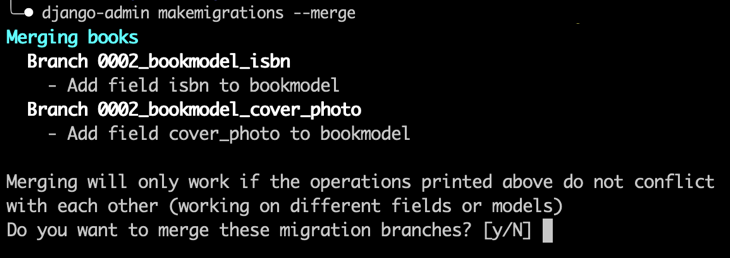
<img src="/assets/images/makemigrations_merge.png" alt="makemigrations --merge" />
Your migrations graph now looks like this:
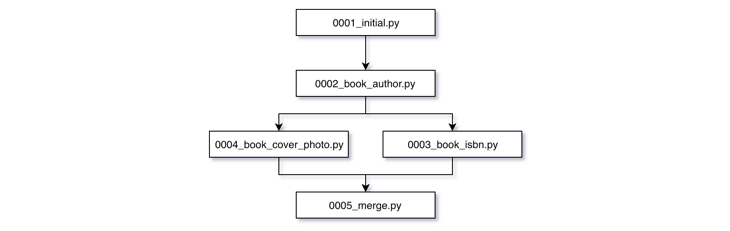
<img src="/assets/images/migrations_graph_1.png" alt="Multiple leaf nodes" />
Run <code class="language-plaintext highlighter-rouge">python manage.py migrate</code> again and everything is fine, Yeeaah!</p>

<p>I personally don’t like having extra merge migration file. Also Django will probably not always merge migrations correctly. There has to be a better way.</p>

<h5 id="option-2">Option 2</h5>
<p>Checkout to <code class="language-plaintext highlighter-rouge">develop</code> branch that <code class="language-plaintext highlighter-rouge">feature/book_isbn</code> and <code class="language-plaintext highlighter-rouge">feature/book_cover_photo</code> merged in. Remove your migration file <code class="language-plaintext highlighter-rouge">0002_book_isbn</code> from migrations folder. Rollback to the most recent common migration between the branches in this case <code class="language-plaintext highlighter-rouge">0002_book_author</code> by running <code class="language-plaintext highlighter-rouge">python manage.py books 0002_book_author</code>. Now you can create a new migration for <code class="language-plaintext highlighter-rouge">Book.isbn</code>. Just run <code class="language-plaintext highlighter-rouge">python manage.py makemigrations books</code> again. You will have <code class="language-plaintext highlighter-rouge">0004_book_isbn</code> migration like in flowchart below. 
<img src="/assets/images/migrations_graph_3.png" alt="Multiple leaf nodes" /></p>

<h3 id="how-to-detect-the-conflict">How to detect the conflict</h3>
<p><a href="https://en.wikipedia.org/wiki/Continuous_integration">Continious Integration</a> at hand, we can check any migration conflicts and fail a build without stupidly trying to apply migrations to our database. This CLI command lists all conflicting migrations exist in the project. Run it from the root of your project.
<code class="language-plaintext highlighter-rouge">find . -type f -name "*.py"|grep -o ".*/migrations/[0-9]\+"|sort|uniq -c|awk '$1 &gt; 1 {print $0}</code></p>

<p>Here is an example in <a href="https://bitbucket.org/product/features/pipelines">Bitbucket-Piplines</a>:</p>

<div class="language-yaml highlighter-rouge"><div class="highlight"><pre class="highlight"><code>
<span class="na">image</span><span class="pi">:</span> <span class="s">python:3.6</span>

<span class="na">pipelines</span><span class="pi">:</span>
  <span class="na">default</span><span class="pi">:</span>
    <span class="s">...</span>
    <span class="s">- step</span><span class="err">:</span>
        <span class="na">name</span><span class="pi">:</span> <span class="s">Apply migrations</span>
        <span class="na">script</span><span class="pi">:</span>
          <span class="s">...</span>
          <span class="s"># Check any conflicting migrations, fail if so</span>
          <span class="s">- CONFLICTING_MIGRATIONS=$(find . -type f -name "*.py" | grep -o ".*/migrations/[0-9]\+" | sort | uniq -c | awk '$1 &gt; 1 {print $0}')</span>
          <span class="s">- if [ -n "${CONFLICTING_MIGRATIONS}" ]; then echo "CONFLICTING MIGRATIONS:${CONFLICTING_MIGRATIONS}"; exit 1; fi;</span>
          <span class="s">...</span>

</code></pre></div></div>

<p>You can put it in your CI pipeline like <a href="https://jenkins.io/">Jenkins</a>, <a href="https://travis-ci.com/">Travis</a> etc.</p>

<h3 id="in-a-nutshell">In a nutshell</h3>
<p>Django migrations are powerfull, magical tool to automate database operations. You have to know ins and outs of it. I hope you get something amazing from this post. Now go &amp; build some cool Django apps.</p>

<h3 id="feedback--comment">Feedback &amp; Comment</h3>
<p>Your feedbacks and comments are most appreciated. Please write your opinion on this topic, share your experiance in the comment section below.</p>]]></content><author><name>Mukhammad Karimov</name><email>hey@karimoff.me</email></author><category term="django" /><category term="django" /><category term="migrations" /><category term="database" /><summary type="html"><![CDATA[Question Have you ever encountered CommandError: Conflicting migrations detected; multiple leaf nodes in the migration graph:? You definetely have if you work on a team developing single django application.]]></summary></entry><entry><title type="html">Python Client for Firebase Dynamic Links</title><link href="https://heykarimoff.github.io/python/firebase-dynamic-links/" rel="alternate" type="text/html" title="Python Client for Firebase Dynamic Links" /><published>2018-11-11T06:20:53+11:00</published><updated>2018-11-11T06:20:53+11:00</updated><id>https://heykarimoff.github.io/python/firebase-dynamic-links</id><content type="html" xml:base="https://heykarimoff.github.io/python/firebase-dynamic-links/"><![CDATA[<h3 id="question">Question</h3>
<p>Have you ever integrated your Python web application (Django, Flask, etc.) to <a href="https://firebase.google.com/docs/dynamic-links/">Firebase Dynamic Links</a> ? Yes, No. It doesn’t matter. This post is for you anyway.</p>

<h3 id="backgroud">Backgroud</h3>
<p>In my last project, I needed a smooth user experience flow for new users who sign up on website, download mobile app (iOS/Android), and automatically login to their account.</p>

<h3 id="solution">Solution</h3>
<p>Todo that I need to generate a user specific <a href="https://en.wikipedia.org/wiki/Deep_linking">Deep Link</a> and redirect the user to it.</p>

<h4 id="result">Result</h4>
<p>I wrote tiny Python package called <a href="https://pypi.org/project/py-fdl/">py-fdl</a> and published to PyPi. 
You will get full documentation with code example in <a href="https://github.com/heykarimoff/py-fdl">GitHub repository</a>.</p>

<h3 id="conclusion">Conclusion</h3>
<p>I just wanted to share with you guys. Please use it if it would fit what you are working.</p>

<h3 id="motivation">Motivation</h3>
<p>Don’t forget put your start to <a href="https://github.com/heykarimoff/py-fdl">the repo</a> so this keeps me motivated to maintain <a href="https://pypi.org/project/py-fdl/">the package</a> further.</p>

<h3 id="feedback">Feedback</h3>

<p><a href="https://github.com/heykarimoff/py-fdl/issues">Feedbacks</a> and <a href="https://github.com/heykarimoff/py-fdl/pulls">contributions</a> are appreciated. Thanks.</p>]]></content><author><name>Mukhammad Karimov</name><email>hey@karimoff.me</email></author><category term="python" /><category term="python" /><category term="firebase" /><category term="dynamic-links" /><summary type="html"><![CDATA[Question Have you ever integrated your Python web application (Django, Flask, etc.) to Firebase Dynamic Links ? Yes, No. It doesn’t matter. This post is for you anyway.]]></summary></entry><entry><title type="html">TruncDate in Django ORM</title><link href="https://heykarimoff.github.io/django/truncdate-in-django-orm/" rel="alternate" type="text/html" title="TruncDate in Django ORM" /><published>2018-02-18T07:20:53+11:00</published><updated>2018-02-18T07:20:53+11:00</updated><id>https://heykarimoff.github.io/django/truncdate-in-django-orm</id><content type="html" xml:base="https://heykarimoff.github.io/django/truncdate-in-django-orm/"><![CDATA[<h3 id="introduction">Introduction</h3>
<p>If you have been programming web application in Django probably you really enjoy Django ORM. 
It’s has advanced capabilities to construct complex SQL queries to any database. Let’s discover some of them. Ready?!</p>

<h3 id="overview">Overview</h3>
<p>Today, we are going to learn how to use <code class="language-plaintext highlighter-rouge">TruncDate</code> in conjunction with annotation and ordering in Django ORM.</p>

<p>Steps are as simple as following:</p>

<ol>
  <li>Create exemplary <code class="language-plaintext highlighter-rouge">Article</code> model.</li>
  <li>Try Django ORM to get list of articles.</li>
  <li>Try to summarize data out of list.</li>
</ol>

<h4 id="create-exemplary-article-model">Create exemplary <code class="language-plaintext highlighter-rouge">Article</code> model</h4>
<div class="language-python highlighter-rouge"><div class="highlight"><pre class="highlight"><code><span class="kn">from</span> <span class="nn">django.db</span> <span class="kn">import</span> <span class="n">models</span>

<span class="k">class</span> <span class="nc">Article</span><span class="p">(</span><span class="n">models</span><span class="p">.</span><span class="n">Model</span><span class="p">):</span>
    <span class="n">title</span> <span class="o">=</span> <span class="n">model</span><span class="p">.</span><span class="n">CharField</span><span class="p">(</span><span class="n">max_length</span><span class="o">=</span><span class="mi">128</span><span class="p">)</span>
    <span class="n">body</span> <span class="o">=</span> <span class="n">models</span><span class="p">.</span><span class="n">TextField</span><span class="p">()</span>
    <span class="n">author</span> <span class="o">=</span> <span class="n">models</span><span class="p">.</span><span class="n">ForeignKey</span><span class="p">(</span><span class="n">User</span><span class="p">)</span>
    <span class="n">tags</span> <span class="o">=</span> <span class="n">models</span><span class="p">.</span><span class="n">ManyToMany</span><span class="p">(</span><span class="n">Tag</span><span class="p">)</span>
    <span class="n">published</span> <span class="o">=</span> <span class="n">models</span><span class="p">.</span><span class="n">BooleanField</span><span class="p">(</span><span class="n">dafault</span><span class="o">=</span><span class="bp">False</span><span class="p">)</span>

    <span class="n">created</span> <span class="o">=</span> <span class="n">models</span><span class="p">.</span><span class="n">DateTimeField</span><span class="p">(</span><span class="n">auto_now</span><span class="o">=</span><span class="bp">True</span><span class="p">,</span> <span class="n">auto_now_add</span><span class="o">=</span><span class="bp">True</span><span class="p">)</span>
    <span class="n">updated</span> <span class="o">=</span> <span class="n">models</span><span class="p">.</span><span class="n">DateTimeField</span><span class="p">(</span><span class="n">auto_now</span><span class="o">=</span><span class="bp">True</span><span class="p">)</span>

    <span class="k">def</span> <span class="nf">__str__</span><span class="p">(</span><span class="bp">self</span><span class="p">):</span>
        <span class="k">return</span> <span class="bp">self</span><span class="p">.</span><span class="n">title</span>

    <span class="k">class</span> <span class="nc">Meta</span><span class="p">:</span>
        <span class="n">ordering</span> <span class="o">=</span> <span class="p">(</span><span class="s">'-created'</span><span class="p">,</span> <span class="p">)</span>
</code></pre></div></div>
<h4 id="try-django-orm-to-get-list-of-articles">Try Django ORM to get list of articles</h4>
<p>To get all Articles from database</p>
<div class="language-python highlighter-rouge"><div class="highlight"><pre class="highlight"><code><span class="n">articles</span> <span class="o">=</span> <span class="n">Article</span><span class="p">.</span><span class="n">objects</span><span class="p">.</span><span class="nb">all</span><span class="p">()</span>
</code></pre></div></div>
<p>To get all published Articles</p>
<div class="language-python highlighter-rouge"><div class="highlight"><pre class="highlight"><code><span class="n">published_articles</span> <span class="o">=</span> <span class="n">Article</span><span class="p">.</span><span class="n">objects</span><span class="p">.</span><span class="nb">filter</span><span class="p">(</span><span class="n">published</span><span class="o">=</span><span class="bp">True</span><span class="p">)</span>
</code></pre></div></div>
<p>To get all published Articles alongside with list of each article tags</p>
<div class="language-python highlighter-rouge"><div class="highlight"><pre class="highlight"><code><span class="n">published_articles</span> <span class="o">=</span> <span class="n">Article</span><span class="p">.</span><span class="n">objects</span><span class="p">.</span><span class="nb">filter</span><span class="p">(</span><span class="n">published</span><span class="o">=</span><span class="bp">True</span><span class="p">).</span><span class="n">select_related</span><span class="p">(</span><span class="s">'tags'</span><span class="p">)</span>
</code></pre></div></div>

<p>Let’s be more ambitious something like all articles published today</p>
<div class="language-python highlighter-rouge"><div class="highlight"><pre class="highlight"><code><span class="kn">from</span> <span class="nn">django.utils</span> <span class="kn">import</span> <span class="n">timezone</span>

<span class="n">today</span> <span class="o">=</span> <span class="n">timenoze</span><span class="p">.</span><span class="n">today</span><span class="p">()</span>
<span class="n">published_articles</span> <span class="o">=</span> <span class="n">Article</span><span class="p">.</span><span class="n">objects</span><span class="p">.</span><span class="nb">filter</span><span class="p">(</span><span class="n">published</span><span class="o">=</span><span class="bp">True</span><span class="p">,</span> <span class="n">created__date</span><span class="o">=</span><span class="n">today</span><span class="p">)</span>
</code></pre></div></div>

<h4 id="try-to-summarize-data-out-of-list">Try to summarize data out of list</h4>
<p>Let us imagine, we want to have info about frequency of published articles in nice tabular format.</p>
<div class="language-html highlighter-rouge"><div class="highlight"><pre class="highlight"><code>Number of published articles in days
22 Feb 2018 :  7 articles
21 Feb 2018 :  4 articles
10 Feb 2018 :  8 articles
28 Jan 2018 : 18 articles
12 Jan 2018 :  8 articles
22 Dec 2017 :  2 articles
22 Nov 2017 :  5 articles
</code></pre></div></div>

<p>We can do this in a single shot of database query like this:</p>
<div class="language-python highlighter-rouge"><div class="highlight"><pre class="highlight"><code><span class="kn">from</span> <span class="nn">django.db.models</span> <span class="kn">import</span> <span class="n">Count</span>
<span class="kn">from</span> <span class="nn">django.db.models.functions</span> <span class="kn">import</span> <span class="n">TruncDate</span>

<span class="n">articles</span> <span class="o">=</span> <span class="n">Article</span><span class="p">.</span><span class="n">objects</span><span class="p">.</span><span class="nb">filter</span><span class="p">(</span><span class="n">published</span><span class="o">=</span><span class="bp">True</span><span class="p">)</span>

<span class="n">bundle</span> <span class="o">=</span> <span class="p">(</span><span class="n">articles</span><span class="p">.</span><span class="n">annotate</span><span class="p">(</span><span class="n">date</span><span class="o">=</span><span class="n">TruncDate</span><span class="p">(</span><span class="s">'created'</span><span class="p">))</span>
                  <span class="p">.</span><span class="n">values</span><span class="p">(</span><span class="s">'date'</span><span class="p">)</span>
                  <span class="p">.</span><span class="n">order_by</span><span class="p">(</span><span class="s">'-date'</span><span class="p">)</span>
                  <span class="p">.</span><span class="n">annotate</span><span class="p">(</span><span class="n">count</span><span class="o">=</span><span class="n">Count</span><span class="p">(</span><span class="s">'id'</span><span class="p">)))</span>
</code></pre></div></div>
<p>Let’s understand bit by bit.
What is <code class="language-plaintext highlighter-rouge">TruncDate</code> is all about? Simple</p>

<p><code class="language-plaintext highlighter-rouge">TruncDate</code> handles very one task, 
<a href="https://docs.djangoproject.com/en/2.0/ref/models/database-functions/#trunc">django documentation</a> says:</p>
<blockquote>
  <p>Truncates a date up to a significant component.</p>
</blockquote>

<p>So <code class="language-plaintext highlighter-rouge">articles.annotate(date=TruncDate('created'))</code> adds new date column that comes from <code class="language-plaintext highlighter-rouge">TruncDate</code>.</p>

<p>After <code class="language-plaintext highlighter-rouge">.values('date').order_by('-date')</code> we get list of dates ordered by most recants first.</p>

<p>Lastly <code class="language-plaintext highlighter-rouge">.annotate(count=Count('id'))</code> counts exact the same dates in the list and saves in <code class="language-plaintext highlighter-rouge">count</code> That’s it.</p>

<p>And then you can render it in Django templates</p>
<pre><code class="language-djangotemplate">Number of published articles in days

</code></pre>

<h3 id="conclusion">Conclusion</h3>
<p>I hope you get something amazing to apply to your next Django project. See you later.</p>]]></content><author><name>Mukhammad Karimov</name><email>hey@karimoff.me</email></author><category term="django" /><category term="django" /><category term="orm" /><category term="database" /><summary type="html"><![CDATA[Introduction If you have been programming web application in Django probably you really enjoy Django ORM. It’s has advanced capabilities to construct complex SQL queries to any database. Let’s discover some of them. Ready?!]]></summary></entry><entry><title type="html">Look this is my first blog post</title><link href="https://heykarimoff.github.io/personal/look-this-is-my-first-blog-post/" rel="alternate" type="text/html" title="Look this is my first blog post" /><published>2018-01-08T07:20:53+11:00</published><updated>2018-01-08T07:20:53+11:00</updated><id>https://heykarimoff.github.io/personal/look-this-is-my-first-blog-post</id><content type="html" xml:base="https://heykarimoff.github.io/personal/look-this-is-my-first-blog-post/"><![CDATA[<h2 id="this-is-my-first-blog-haha-this-is-so-cool-">This is my first blog, haha this is so cool :)</h2>

<p>Hello my friend, how are you doing? If you ask me, I would say: I am coooool :) 
Why? because I have started blogging today, yeah, finally. I’ve just started typing few minutes ago.</p>

<p>But first let me tell you the main reasons why I am opening this blog. They are twofold.</p>

<h2 id="1-gaining-knowledge">1. Gaining knowledge</h2>

<p>Until this day whenever I stuck on something, I always ask from people, my teachers, friends, coworkers.
Thankfully, they helped me a lot, taught me things I don’t know.</p>

<p>Moreover I also use Google. 
I googled from what’s the gravitational formula to where’s the capital of Cambodia, 
or regular expressions in python or how to publish android app in Google Play.</p>

<p>I do all this kind of searching daily, monthly, yearly. Everybody does this in today’s world. You too. don’t you?</p>

<p>I decided, if I wrote what I gained in somewhere it would be easier to remember, refresh my mind when I’ve forgotten.</p>

<h2 id="2-spreading-knowledge">2. Spreading knowledge</h2>

<p>I really love sharing what knowledge I have to my friends, classmates, people I know. 
I feel grateful when my friends ask me something I know and that thing would be beneficial for all.</p>

<p>Unfortunately, I cannot reach everybody, I know there are a lot of cool buddies who ‘lost starts’. 
Through this blog little knowledge can reach those people who are very unknown to me.</p>

<p>It is highly improbable to find what you are searching in here. However this is my commitment to make gigantic internet beautiful.</p>

<h2 id="whats-next">What’s next</h2>
<p>If you are in to programming, DIY hacks or traveling like a wanderlust this blog is for you.<br />
My dear reader, I am coming close to you and become a part of your beautiful heart, please be patient.</p>

<h2 id="conclusion">Conclusion</h2>

<p>This is a single step by me to a long journey with you all dears. I really hope you are all get some benefit from my blog.</p>]]></content><author><name>Mukhammad Karimov</name><email>hey@karimoff.me</email></author><category term="personal" /><summary type="html"><![CDATA[This is my first blog, haha this is so cool :)]]></summary></entry></feed>